
The new Location feature for organizations is now live on the Mandated Reporter Training platform.
This new feature is ideal for organizations with multiple locations or departments. It makes it easier to support teams of learners with different training needs. Plus, the ability to add multiple locations and assign Location Admins makes managing training across one account more fluid.
Find out how this new feature can upgrade your organization’s experience below.
Leverage Your Management Team
Many organizations are required to offer Mandated Reporter Training to their employees. These organizations may include, depending on the laws in your state, childcare providers, schools, businesses that employ minors, and more.
Managing training distribution for large organizations can be tedious. The Locations feature is now part of a suite of tools available to organizations on the Mandated Reporter Training platform that can make that process simpler.
The Location feature enables organization admins to create “sub-accounts” within a single Organization account. Locations can be divided by address, department, or any other division that makes sense for your organization.
With the Location feature, admins can:
- Add learners to specific locations.
- Assign training based on location.
- Organize and track training data.
- Assign location-specific administrators to manage learners.
Getting Started
Ready to get the most out of the Mandated Reporter Training platform? Creating an Organization account gives you access to tools needed to manage your organization, including our new Location feature.
Learn more about the benefits of an Organization account.
Add a Location
Locations can be utilized by any organization, but are especially beneficial for organizations that operate across large campuses, multiple sites, or franchises.
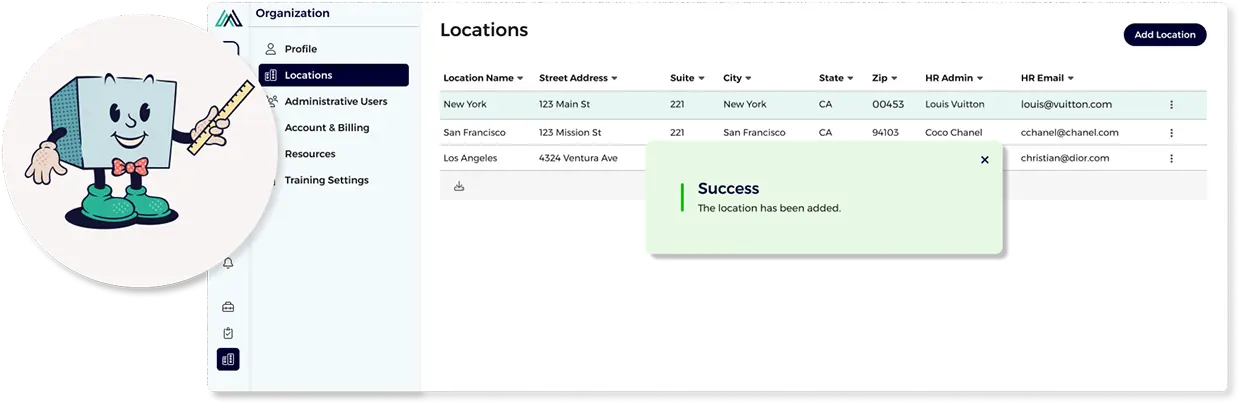
If you already have an Organization account, here are the steps to add a new location:
- Navigate to the menu and open “Organization,” then “Locations.”
- There, in the upper right corner, you’ll find an “Add Location” button.
- Fill out all required fields and add your new location.
Add Location Admins
Location Admins are in place for organization and delegation. A Location Admin will only have access to the information they are tasked with managing, including: groups, learners, and training for their assigned location.
To assign a Location Admin:
- Navigate to Administrative Users under the Organization menu.
- Click “Add User” and fill out the blank fields.
- Under “Role,” assign the user “Location Admin.”
- Select the appropriate location in the dropdown.
Add Learners to a Location
Learners can be added to a location through the Learners page. At the top of the learner page, filter into a location and add learners from there.
Ready to set up an Organization account and access this new feature? Register today to get started.